Friday, 29 June 2018

Python

HELP PYTHON PLEASE...AL THE ANSWERS FOR THIS ON CHEGG IS WRONG...NONE OF THEM RUNS!!!
Python Help Please....
Part #1: Month class
Design a Python class for a calendar month. You class should have the following methods:
__init__ (self, name, days, first): start is the day of the week that the first falls on.
getName(self): returns the name of the month
getDays(self): returns the number of days
getFirst(self): returns the first day of the month
Add a main() method to the script that creates a couple month objects and calls the three get() methods of each to display to the screen.

class Month:
def __init__(self, name, days, first):
self.name = name
self.days = days
self.first = first
def getName(self):
return self.name
def getDays(self):
return self.days
def getFirst(self):
return self.first
def main():
month = Month("May", 31, "Monday")
print(month.getName())
print(month.getDays())
print(month.getFirst())
 
month = Month("April", 30, "Saturday")
print(month.getName())
print(month.getDays())
print(month.getFirst())
 
month = Month("June", 30, "Thrusday")
print(month.getName())
print(month.getDays())
print(month.getFirst())
if __name__ == '__main__':
main()
# code link: https://paste.ee/p/SSEac

Java Solution

please email or whatsapp for Solution
 +923432547206
bilalarif63@yahoo.com
1)Testing
The first part of the project focuses on developing the ability to write test cases for an existing class.
In the project pack, a directory called testme contains multiple implementations of a simple system to calculate various salary-related things. One of these implementations is correct, while the remaining ones all contain bugs. You will write test cases based on the provided class documentation to discern which implementation is correct. The correct implementation should pass all tests while the buggy versions should all fail at least one test, likely many more. You will earn credit for each wrong implementation that fails tests (when the correct one is still passing tests!), and for correctly identifying the correct version.
Importantly, you do not have access to the source code for any of the implementations. Instead, you must rely on the documentation of the intended purpose of the classes to develop your tests.
Each implementation is in its own package and subdirectory. Later sections describe how to run your single testing file against any particular implementation without copying files around. (hint: opening and closing files repeatedly in DrJava is not a good workflow).
Debugging
The second part of the project involves developing your skills to trace code and utilize the debugger to follow execution.
The debugme directory of the project pack contains DebugMe.java, a sneaky program which requires a lot of command line arguments to be passed into it to run to completion. The first argument will always be your GMU netID (e.g. gmason76) which will uniquely use the arguments for you in ways different from other students.
DebugMe.java is divided into a series of phases with each requiring different command line input to complete. Your task is to use the debugger, reverse-engineer what is happening in each phase-method, and determine what command-line arguments are necessary in order to satisfy the phase. When missing or improper inputs are detected in a phase, the program throws exceptions and escapes back to attempt the next phase. You will earn points for each phase that you successfully "defuse".
Honor Code for this Project
Honor code policies are in effect for this project as always, but it bears considering how it relates to specific nature of the tasks. Keep the following in mind as you work.
You are not allowed to collaborate on projects. They should reflect your own efforts.
For the Problem 1: Testing, you may not share the test cases you make with other students.
It is forbidden to discuss whether an implementation is buggy or proper for the Testing problem.
You can discuss syntax of what test cases look like and high-level strategies for what to test (ex: The docs says the class is supposed to do this so I'm writing a test that checks that case).
It is forbidden to directly discuss the "secret" to passing a particular phase of the Problem 2: Debugging.
You can discuss how to use the debugger in public forums and strategies of where to set breakpoints to speed debugging along
When in doubt, start a piazza post as private, and we can change it to public after the fact as needed.
https://cs.gmu.edu/~marks/211/projects/p5.html (please download all file from here)
p5pack/
|
+--ANSWERS.txt : Describe written answers to problems in this file
|
+--debugme/
|  |
|  +--DebugMe.java
|
+--testme/
   |
   +--docs/               (javadoc output for an implementation)
   |  |
   |  +--index.html
   |  +--...
   |
   +--PayrollTest.java  (write more tests here)
   |
   +--junit-4.12.jar
   |
   +--imp1/
   |  |
   |  +--payroll
   |     |
   |     +--Dict.class
   |     |
   |     +--Payroll.class
   | 
   +--imp2/
   |  |
   |  +--payroll
   |     |
   |     +--Dict.class
   |     |
   |     +--Payroll.class
   | 
   +--remaining impN/ directories: same structure as imp1/ and imp2/ above
   |
   ...
Test Mode Activated
The first task is to add many @Test-annotated methods to PayrollTest.java and determine which of the many implementations are bad, and which one is good. Then describe your results in ANSWERS.txt.
The code we're testing out tries to calculate various salary-related things based on employees and their (yearly) salaries. The implementor got a bit carried away and made a very generic Dict<K,V> class to track the (key,value) pairings representing (employee-name, yearly-salary), as part of the calculation.
We linked the Javadoc documentation to this part of the project at the top of this specification. A copy is also included in p5pack/testme/docs. You could locally open up the p5pack/testme/docs/index.html file without being online.
We're only supplying the .class files for each implementation; you don't get to look for the bugs directly, you have to just think about what the purpose of the code is, and then write test cases based on that purpose. (You're writing "black box" test cases).
Running Your Tests
Note that running one test file against many implementations can be tedious if we're not smart about it. A typical (but bad) novice approach is to make many copies of the file which will quickly get out of sync as changes are made to one and the copies are not updated.
Instead, utilize the ability of the compiler and runtime of java to set a class path on the command line to cause a search for classes in the specified locations. Navigate to the testme/ directory and run commands like the following which runs tests on implementation 1 only:
demo$ javac -cp .:imp1/:junit-4.12.jar *.java
demo$ java  -cp .:imp1/:junit-4.12.jar PayrollTest
These commands tell Java that it should first compile all .java files it finds when looking in the current directory (.), in the imp1/ directory, and it should also look through the junit-4.12.jar file while compiling; then, it again needs access to code in all three of those locations, but it should run the main method of PayrollTest.
If you want to run tests on a different implementation, just change the imp1 to a different directory, as in
demo$ javac -cp .:imp2/:junit-4.12.jar *.java
demo$ java  -cp .:imp2/:junit-4.12.jar PayrollTest
For this task, the command line is likely superior to most IDEs. For instance, these commands will not work in DrJava. It's likely that most IDEs will struggle with this task. Take this as an opportunity to beef up your command line skills. It offers the ultimate flexibility and the only price to unlock that is a little practice (on the order of cut-pasting some ready-made commands).
Scripts to run tests
To ease the task of testing on the command line, two scripts are provided which will compile and run all implementations.
On Unix/Mac OS X use the unix-compile-test.sh script in a terminal.
> cd testme
> unix-compile-test.sh
Results of testing all implementations are summarized by only showing how many tests failed (or that it was OK!). If you need to understand why a particualr implementation is behaving some way, then don't use the script here, use the just-one-implementation commands shown above!
On Windows use the windows-compile-test.cmd script in the cmd.exe terminal.
> cd testme
> windows-compile-test.cmd
Results will be left in the results.txt text file due to the lack of a good grep on the Windows platform.
Goals for the Testing Problem
Multiple implementations of the payroll package are provided. One of these is correct while the remainder are crap. It is known that implementations imp2, imp8, and imp11 are broken.
To complete this project, do the following:
Create enough tests that all implementations but one are failing at least one test.
Write tests for both the Dict and Payroll classes. Problems may exist in one, the other, or both.
Document your test cases to indicate what they are testing. Part of your grade will be assigned based on the documentation of test cases.
Submit your PayrollTest.java file which we will run against all implementations.
Identify the general flaws in the behavior of each of the known broken implementations. Describe these flaws in a few sentences in the provided ANSWERS.txt file which will be submitted with your code.
Demo of Dict
The Dict class provides a quite simple dictionary implementation. Below is a demonstration of creating one and calling some of its methods.
> import payroll.*;
> Dict<String,Integer> d = new Dict<String,Integer>();
> d.put("one",1);
> d
{(one:1)}
> d.size()
1
> d.put("two",2);
> d.put("three",3);
> d.size()
3
> d.get("one")
1
> d.get("350")
java.util.NoSuchElementException: "350" key not in dict.
        at payroll.Dict.complainNoKey(Dict.java:147)
        at payroll.Dict.get(Dict.java:70)
> d.pop("two")
2
> d.toString()
"{(one:1),(three:3)}"
> d.keys()
[one, three]
> d.clear()
> d
{}
>
Demo of Payroll
The Payroll class uses the Dict class in its implementation of some salary-related calculations. Below is a demonstration of some basic uses of Payroll.
> import payroll.*;
> Payroll p = new Payroll()
> p.hire("A",120);
> p.hire("A",120)
> p.hire("B",240)
> p.employees()
[A, B]
> p.topSalary()
240
> p.hire("C",1500)
> p.topSalary()
1500
> p.fire("C")
true
> p.employees()
[A, B]
> p.fire("C")
false
> p.giveRaise("A",0.5)
> p.getSalary("A")
180
> p.giveRaise(1.0) // everyone gets 100% raise!
> p.getSalary("A")
360
> p.getSalary("B")
480
> p.monthlyExpense() // for one month of twelve.
70
>
DebugMe!
A Programming Puzzle
The file debugme/DebugMe.java is provided in the code pack and contains a puzzle. The main() method in this program accepts a series of command line arguments that, when correctly specified, will cause the program to run to completion. If the command line arguments are not specified correctly, the program will fail prematurely. The purpose of this problem is to determine the correct inputs to cause the program to run to completion.
DebugMe is arranged in "stages" and passing stages earns points. After each run the program prints the points earned based on the stages "passed". Example:
> java DebugMe msnyde14 0 0 0
Let the games... BEGIN!
Phase One, let's have some fun!

        Double debugger burger, order up!

oops! Game Over... >:( 

  * Score: 0/55 pts *
Notice that the first argument is always your NetID. Don't use msnyde14 unless you are Prof. Snyder. DebugMe uses your NetID to create a unique set of conditions which you must pass so that your experience with the program will likely be different from other students.
This task is actually kinder to you - if you fail one phase, you are able to continue to the next.
The stages in DebugMe are intentionally obscure. This is code that is meant to be a puzzle rather than easily readable and to that end, you are strongly encouraged to use a debugger while analyzing the program. Debuggers allow you to stop execution at any point and examine variables, step forward line by line, and ultimately identify which kinds of command line arguments will make it through a stage and which will cause the dreaded failure() method to be invoked ending the run. A primary goal of this problem is to gain experience with debuggers as they are incredibly useful tool for a programmer to have in their utility belt. Credit for the problem is entirely based on how many stages are passed.
Command Line Arguments
The only artifact of your efforts will be the specific command-line invocation of the program, as your only inputs are given as command-line arguments.
the first command-line argument must be your GMU netID, e.g. gmason76. Many of the phases will use this to randomize and personalize the code for you - you've got your very own unique project!
each phase (method) will read the next few arguments (however many it needs), and use them in more and more quirky ways.
towards the end of each phase, there will be some check and a guarded call to failure(). Your goal is to figure out what command-line arguments will cause these failures to never happen.
if you need to include spaces in a single argument, please use double-quotes.
Running DebugMe through the Debugger
How can we use the debugger with command-line arguments? It's surprisingly easy in DrJava:
Compile DebugMe.java
Set a breakpoint in the phase you're working on
Turn on debugging mode under the debugging menu
In the Interactions Pane, run a command like this to launch DebugMe with command line arguments.
> java DebugMe msnyde14 0 0 0
Let the games... BEGIN!
Phase One, let's have some fun!
oops! Game Over... >:( 

        error msg: Failure! Double debugger burger, order up!

  * Score: 0/55 pts.
If you've turned on debugging, though, you get to step through and see what's happening.
Most IDEs have a means of running a program through a debugger. Learn about your tool if you are not using DrJava.
For the brave, there is also a command line debugger, command jdb which should be installed with every JDK. This is somewhat less convenient as it provides only limited source code display but can work with some classic unix tools.
Regardless of how you access the debugger, you will want to familiarize yourself with features such setting breakpoints to stop the running program, stepping forward line by line, and displaying the values of variables.
DebugMe is not a "real" program as it is intentionally obscure. However, as an exercise to learn how to analyze running programs it will provide invaluable experience. Happy bug squashing.
package pack5;
import java.util.*;
public class DebugMe {

public static void main(String[] args){
    int argsNeeded = 29;
    if (args.length<argsNeeded){
      String[] temp = new String[argsNeeded];
      for (int i=0; i<argsNeeded; i++){
        if (i<args.length){ temp[i] = args[i]; }
        else { temp[i] = ""; }
      }
      args = temp;
    }
 
    String userID = args[0];
    int hash = Math.abs(userID.hashCode());
    hash %= 20000;
 
    int score = 0;
    int[] points = {5,5,5,6,6,6,7,7,8};
    int pi = 0;
    int maxScore = 0; for (int p : points) { maxScore += p; }
    boolean lost = false;
    try {
      System.out.println("Let the games... BEGIN!");
   
      System.out.println("Phase One, let's have some fun!");
      phase1(hash, args,1);
      score+=points[0];
    }
    catch (Exception e){
      lost = true;
    }
    try {
      if (!lost){
        System.out.println("Good for you, time for phase two!");
      }
      phase2(hash, args,4);
      score+=points[1];
    }
    catch (Exception e){
      lost = true;
    }
    try {
      if (!lost){
        System.out.println("O-M-G, here's phase three!");
      }
      phase3(hash, args,7);
      score+=points[2];
    }
    catch (Exception e){
      lost = true;
    }
    try {
      if (!lost){
        System.out.println("time for more, here's phase four.");
      }
      phase4(hash, args,11);
      score+=points[3];
    }
    catch (Exception e){
      lost = true;
    }
    try {
      if (!lost){
        System.out.println("still alive? Here's phase five.");
      }
      phase5(hash, args,15);
      score+=points[4];
    }
    catch (Exception e){
      lost = true;
    }
    try {
      if (!lost){
        System.out.println("watch out, here comes a wall of bricks! It's time for you to solve phase six.");
      }
      phase6(hash, args,17);
      score+=points[5];
    }
    catch (Exception e){
      lost = true;
    }
    try {
      if (!lost){
        System.out.println("next it's phase eleven! oops, seven.");
      }
      phase7(hash, args,21);
      score+=points[6];
    }
    catch (Exception e){
      lost = true;
    }
    try {
      if (!lost){
        System.out.println("youre doing great - now try phase eight!");
      }
      phase8(hash, args,24);
      score+=points[7];
    }
    catch (Exception e){
      lost = true;
    }
    try {
      if (!lost){
        System.out.println("finally, the finish line - I hope that you can solve phase nine!");
      }
      phase9(hash, args,27);
      score+=points[8];
    }
    catch (Exception e){
      lost = true;
    }
    if (!lost){
      System.out.println("Hey, neat - the task's complete!");
    }
    else {
      System.out.println("oops! Game Over... >:( ");
    }
    System.out.printf("\n * Score: %s/%s pts *\n",score,maxScore);
}

// 3 args
public static void phase1(int hash, String[] args, int argStart){
    int a = Integer.parseInt(args[argStart+0]);
    int b = Integer.parseInt(args[argStart+1]);
    int c = Integer.parseInt(args[argStart+2]);
 
    a += hash % 40;
 
    if (a<b && b>c && a<c) { return; }
    failure("Double debugger burger, order up!");
 
}

// 3 args
public static void phase2(int hash, String[] args, int argStart){
    int a = Integer.parseInt(args[argStart+0]);
    int b = Integer.parseInt(args[argStart+1]);
    int c = Integer.parseInt(args[argStart+2]);
 
    a += hash%26;
 
    int v = a+b;
    v *= a;
    v /= b;
    v += 14;
    if (c!=v){ failure("these are not the ints you're searching for..."); }
}

// 4 args
public static void phase3(int hash, String[] args, int argStart){
    int a = Integer.parseInt(args[argStart+0]);
    int b = Integer.parseInt(args[argStart+1]);
    int c = Integer.parseInt(args[argStart+2]);
    int d = Integer.parseInt(args[argStart+3]);
 
    if (hash%13 > 4) {
      c += hash%13;
    }
    else {
      a *= hash%5 + 1;
    }
 
    int temp = 0;
    do {
      temp += a;
      temp *= b;
    } while (c --> 0);
    if (temp != d) failure("count around, products abound; what's that there - an arrow? uh-oh...");
}

// 4 args
public static void phase4(int hash, String[] args, int argStart){
    String s = args[argStart+0];
    int a = Integer.parseInt(args[argStart+1]);
    int b = Integer.parseInt(args[argStart+2]);
    int c = Integer.parseInt(args[argStart+3]);
 
    String temp1 = s.substring(a,b);
    String temp2 = s.substring(b,c);
    int temp3 = 0;
    while (temp3<temp1.length() && temp3<temp2.length()){
      if (temp1.charAt(temp3) != temp2.charAt(temp3)){
        break;
      }
      temp3++;
    }
    if (temp3!=6) failure("over here and over there, I need a certain kind of pair...");
}

// helperfor phase 5.
public static String collatzString(int n){
    String s = "[";
    while (n!=1){
      s += n+", ";
      if (n%2==0){
        n/=2;
      }
      else {
        n = n*3+1;
      }
    }
    s += "1]";
    return s;
}

// 2 args
public static void phase5(int hash, String[] args, int argStart){
    int a = Integer.parseInt(args[argStart+0]);
    int b = Integer.parseInt(args[argStart+1]);
    String s = collatzString(a);
    if (b != s.length()) {
      failure("collecting strings and lengths of things in one big batch; so what should match?");
    }
}

// 4 args
public static void phase6(int hash, String[] args, int argStart){
    // TODO: remove
    // use hash and % to look into a many-way switch;
    // each one calls another function with different args.
    // those args are used to loop around code with some
    // bizarre if-conditions that modify a target or check
    // the target, figuring out when to jump ship. Some
    // branches failure() out. Students need to change one
    // of their inputs to guarantee that an escapable path
    // is chosen (they should be able to guarantee it as
    // all those function-calls' args are variants on their
    // provided CLI args).
 
    int a = Integer.parseInt(args[argStart+0]);
    int b = Integer.parseInt(args[argStart+1]);
    int c = Integer.parseInt(args[argStart+2]);
    int v = 0;
    int temp = 6;
    switch (a + hash%11){
      case 1: v = helper3 (hash,a+12,b,temp++); break;
      case 2: v = helper3 (hash,a*20,b-a,5); break;
      case 3: v = helper3 (hash,a-310,a-b,5); break;
      case 4: v = helper3 (hash,(int)Math.pow(a,2),b,5); break;
      case 5: v = helper3 (hash,(int)Math.pow(2,a),b,5); break;
      case 6: v = helper3 (hash,b,a,temp--); break;
      case 7: v = helper3 (hash,a,b+a,temp*2); break;
      case 8: v = helper3 (hash,a+temp,b-temp,temp%temp); break;
      case 9: case 10: case 11:
        v = helper3 (hash,a,b,temp+10); break;
      default: v = -1;
    }
    if ( ! secretMessages[c].equals(args[v])) { failure("wrong message!"); }
}

private static String[] secretMessages = {
    "a closed mouth gathers no feet",
    "a waist is a terrible thing to mind",
    "out of my mind - back in five minutes",
    "the harder I work, the luckier I become",
    "with great power comes a big electricity bill",
    "time flies like an arrow; fruit flies like a banana",
    "five exclamation marks, the sure sign of an insane mind",
    "I do not like green eggs and ham, I do not like them, Sam-I-am.",
    "CS majors need to take ENGH302*N*, not just any section of ENGH302",
    "+++Divide By Cucumber Error. Please Reinstall Universe And Reboot +++",
    "there are 10 kinds of people in the world, those who understand binary and those who don't"
};

public static int helper3(int hash, int x, int y, int z){
    // TODO: remove.
    // goal: return a number from 10 to 20.
 
    for (int j=0; j<y; j++){
      if (prime(j)){
        z+=1;
      }
    }
    if (z<10 || z>20){ failure("uh-oh!"); }
    return z;
}

public static boolean prime(int n){
    if (n<2) return false;
    for (int i=2; i<n; i++){
      if (n%i==0) { return false; }
    }
    return true;
}

/*
   * TODO: remove.
   * give them a recursive function, like fibonacci, and they need an input that drives
   * a match to another value (either another argument or just something hardcoded based
   * on their hash)
   *
   */
public static int sumRange(int start, int stop){
    if (start > stop) { return 0; }
    return start + (sumRange(start+1, stop));
}

// 3 args
public static void phase7(int hash, String[] args, int argStart){
    int a = Integer.parseInt(args[argStart+0]);
    int b = Integer.parseInt(args[argStart+1]);
    int c = Integer.parseInt(args[argStart+2]);
    int d = sumRange(a,b);
    if (c!=d) { failure("round and round and round she goes, but where she stops, nobody knows!"); }
}

// With all this randomness, surely you want to step through with the
// debugger, yes?

// 3 args
public static void phase8(int hash, String[] args, int argStart) {
    Random r = new Random(hash);
    int a = Integer.parseInt(args[argStart+0]);
    int b = Integer.parseInt(args[argStart+1]);
    int c = Integer.parseInt(args[argStart+2]);
    int s = 0;
    for (int i=0; i<a; i+= b){
      if (r.nextInt(hash)%c==0){
        s += 1;
      }
    }
    if (s!=10) { failure("level one, as yet undone! "+s); }
}

// Generating so much data, how can you find a reliable answer?
// Remember, you can't change the source code for your submitted
// solution...

// 2 args
public static void phase9(int hash, String[] args, int argStart){
    createWaldoPage(args,argStart);
}

private static String letters = "ABCDEFGHIJKLMNOPQRSTUVWXYZabcdefghijklmnopqrstuvwxyz";

// hmmm, what happens if this is true??? not that you can change it
// for the final submission...
public static final boolean DEBUG = false;
public static void debug(Object msg){ if (DEBUG) { System.out.print(""+msg); } }
public static void debugln(Object msg){ debug(msg+"\n"); }

public static String[] createWaldoPage(String[] args, int argStart){
    int hash = Math.abs(args[0].hashCode()) ;
    debugln("hash = "+hash);
    int n = Integer.parseInt(args[argStart+0]);
    int maxChanges = Integer.parseInt(args[argStart+1]);
    debug(String.format("n=%s, maxChanges=%s\n",n,maxChanges));
    String[] crowd = new String[n];
    for (int i = 0; i<n; i++){
      crowd[i] = mutate("waldo", maxChanges, hash++);
    }
    checkWaldoPage(crowd);
    return crowd;
}

public static void checkWaldoPage(String[] crowd){
    ArrayList<Integer> indexes = new ArrayList<Integer>();
    for (int i=0; i<crowd.length; i++){
      debugln("c[i] = "+crowd[i]);
      if (crowd[i].equals("waldo")){
        debugln(i);
        indexes.add(i);
      }
    }
    if      (indexes.size() < 1) DebugMe.failure("couldn't find waldo!");
    else if (indexes.size() > 1) DebugMe.failure("highlander rule: there can be only one (waldo)! "+indexes.size());
}

public static String mutate(String s, int n, int seed){
    debug(String.format("mutation(%s#): %s (hash=%s)\n",n,s,seed));
    Random r = new Random(seed);
    for (int i=0; i<n; i++){
      s = attemptChange(s, seed++);
    }
    debugln(" --> "+s);
    return s;
}

public static String attemptChange(String s, int seed){
    debug(String.format("\tattempt(seed=%d): %s\n",seed,s));
    Random r = new Random(seed);
    int i = r.nextInt(s.length()+5);
 
    switch(r.nextInt(3)){
      case 0:
        try{
        debug(String.format("\t\t%s(%s)%s\n",s.substring(0,i),letters.charAt(i),s.substring(i)));
        s = String.format("%s%s%s",s.substring(0,i),letters.charAt(i),s.substring(i));
      } catch (StringIndexOutOfBoundsException e) { }
      break;
      case 1:
        try{
        debug(String.format("\t\t%s(%s/%s)%s\n",s.substring(0,i),letters.charAt(i),s.charAt(i),s.substring(i+1)));
        s = String.format("%s%s%s",s.substring(0,i),letters.charAt(i),s.substring(i+1));
      } catch (StringIndexOutOfBoundsException e) { }
      break;
      case 2:
        try{
        s = s.substring(0,i)+s.substring(i+1);
      } catch (StringIndexOutOfBoundsException e) { }
      break;
      default:
        debugln("\n\n\n\t   --> DEFAULT!\n\n\n");
    }
    return s;
}

// any time the program has wandered into the wrong spot, we call this
// to indicate the phase was not successfully passed.
public static void failure(String msg){
    System.out.println("\n\t"+msg+"\n");
    throw new RuntimeException("Failure! "+msg);
}
}
Here is link of project
https://cs.gmu.edu/~marks/211/projects/p5.html

Java Solution

Please email for solution or whatsapp
bilal63@yahoo.com
+923432547206
Java Problem: Need help with writing test cases.
Please help me write a series of "black box" test cases based on the Javadoc. The link to the package and Javadoc are provided at the bottom.
There are 13 implementations, and impl 2,8 and 11 are broken. The other implementations must pass all test cases, except impl 2, 8 and 11. This program is about PayRoll.
Here is the summary of the task:
The task is to add many @Test-annotated methods to PayrollTest.java and determine which of the many implementations are bad, and which one is good.
The code we're testing out tries to calculate various salary-related things based on employees and their (yearly) salaries. The implementor got a bit carried away and made a very generic Dict<K,V> class to track the (key,value) pairings representing (employee-name, yearly-salary), as part of the calculation.
We're only supplying the .class files for each implementation; you don't get to look for the bugs directly, you have to just think about what the purpose of the code is, and then write test cases based on that purpose. (You're writing "black box" test cases).
Running Your Tests
Note that running one test file against many implementations can be tedious if we're not smart about it. A typical (but bad) novice approach is to make many copies of the file which will quickly get out of sync as changes are made to one and the copies are not updated.
Instead, utilize the ability of the compiler and runtime of java to set a class path on the command line to cause a search for classes in the specified locations. Navigate to the testme/ directory and run commands like the following which runs tests on implementation 1 only:
demo$ javac -cp .:imp1/:junit-4.12.jar *.java
demo$ java  -cp .:imp1/:junit-4.12.jar PayrollTest
These commands tell Java that it should first compile all .java files it finds when looking in the current directory (.), in the imp1/ directory, and it should also look through the junit-4.12.jar file while compiling; then, it again needs access to code in all three of those locations, but it should run the main method of PayrollTest.
If you want to run tests on a different implementation, just change the imp1 to a different directory, as in
demo$ javac -cp .:imp2/:junit-4.12.jar *.java
demo$ java  -cp .:imp2/:junit-4.12.jar PayrollTest
For this task, the command line is likely superior to most IDEs. For instance, these commands will not work in DrJava. It's likely that most IDEs will struggle with this task. Take this as an opportunity to beef up your command line skills. It offers the ultimate flexibility and the only price to unlock that is a little practice (on the order of cut-pasting some ready-made commands).
Scripts to run tests
To ease the task of testing on the command line, two scripts are provided which will compile and run all implementations.
On Unix/Mac OS X use the unix-compile-test.sh script in a terminal.
> cd testme
> unix-compile-test.sh
Results of testing all implementations are summarized by only showing how many tests failed (or that it was OK!). If you need to understand why a particualr implementation is behaving some way, then don't use the script here, use the just-one-implementation commands shown above!
On Windows use the windows-compile-test.cmd script in the cmd.exe terminal.
> cd testme
> windows-compile-test.cmd
Results will be left in the results.txt text file due to the lack of a good grep on the Windows platform.
Goals for the Testing Problem
Multiple implementations of the payroll package are provided. One of these is correct while the remainder are crap. It is known that implementations imp2, imp8, and imp11 are broken.
To complete this project, do the following:
Create enough tests that all implementations but one are failing at least one test.
Write tests for both the Dict and Payroll classes. Problems may exist in one, the other, or both.
Document your test cases to indicate what they are testing. Part of your grade will be assigned based on the documentation of test cases.
Submit your PayrollTest.java file which we will run against all implementations.
Identify the general flaws in the behavior of each of the known broken implementations. Describe these flaws in a few sentences in the provided ANSWERS.txt file which will be submitted with your code.
----Here is the Demo---
Demo of Dict
The Dict class provides a quite simple dictionary implementation. Below is a demonstration of creating one and calling some of its methods.
> import payroll.*;
> Dict<String,Integer> d = new Dict<String,Integer>();
> d.put("one",1);
> d
{(one:1)}
> d.size()
1
> d.put("two",2);
> d.put("three",3);
> d.size()
3
> d.get("one")
1
> d.get("350")
java.util.NoSuchElementException: "350" key not in dict.
        at payroll.Dict.complainNoKey(Dict.java:147)
        at payroll.Dict.get(Dict.java:70)
> d.pop("two")
2
> d.toString()
"{(one:1),(three:3)}"
> d.keys()
[one, three]
> d.clear()
> d
{}
>
Demo of Payroll
The Payroll class uses the Dict class in its implementation of some salary-related calculations. Below is a demonstration of some basic uses of Payroll.
> import payroll.*;
> Payroll p = new Payroll()
> p.hire("A",120);
> p.hire("A",120)
> p.hire("B",240)
> p.employees()
[A, B]
> p.topSalary()
240
> p.hire("C",1500)
> p.topSalary()
1500
> p.fire("C")
true
> p.employees()
[A, B]
> p.fire("C")
false
> p.giveRaise("A",0.5)
> p.getSalary("A")
180
> p.giveRaise(1.0) // everyone gets 100% raise!
> p.getSalary("A")
360
> p.getSalary("B")
480
> p.monthlyExpense() // for one month of twelve.
70
>
----Here is the java test that must be modified---
import org.junit.*; // Rule, Test
import org.junit.rules.Timeout;
import static org.junit.Assert.*;
import java.util.*;
import payroll.*;
public class PayrollTest {
public static void main(String args[]){
org.junit.runner.JUnitCore.main("PayrollTest");
}
 
// 1 second max per method tested
@Rule public Timeout globalTimeout = Timeout.seconds(1);
// BEGIN TESTS HERE.
// Eliminate this test after you get the hang of things
@Test public void example(){
assertEquals(5,5);
assertFalse(5==6);
assertTrue(6==6);

 
}
---Here is the link to the package of all the implementations and Javadoc---
https://paste.ee/p/6w7Tp
Please open and download the package.

Thursday, 28 June 2018

Free Cheeg Solution

Problems in this exercise refer to the following instruction sequences: I1: ADD R1, R2, R1 I2: LW R2, 0(R1) I3: LW R1, 4(R1) I4: OR R3, R1, R2 1) Find all data dependences in this instruction sequence. 2) Find all hazards in this instruction sequence for a 5-stage pipeline with and then without forwarding. 3)To reduce clock cycle time, we are considering a split of the MEM stage into two stages. Find all hazards in this instruction sequence for this 6-stage pipeline with and then without forwarding.

Solution:
Given instruction sequences:
I1: ADD R1, R2, R1
I2: LW R2, 0(R1)
I3: LW R1, 4(R1)
I4: OR R3, R1, R2
(1) In given instruction sequences, the following data dependencies occur:
RAW: Read-After-Write
WAR: Write-After-Read
WAW: Write-After-Write
These data dependencies are given in Table 1 with instruction sequences:
Table 1: Data dependencies
Instruction Sequences
RAW
WAR
WAW
I1: ADD R1, R2, R1
I2: LW R2, 0(R1)
I3: LW R1, 4(R1)
I4: OR R3, R1, R2
(R1) I1 to I2, I3
(R2) I2 to I4
(R1) I3 to I4
(R2) I1 to I2
(R1) I1, I2 to I3
(R1) I1 to I3
(2) In the given instruction sequences for a 5-stage pipeline, only RAW data dependence can occur data hazards.
With forwarding and without forwarding, only RAW dependence from a load to the very next instruction become data hazards and any RAW dependence from an instruction to one of the
following 3 instructions becomes a hazard respectively.
RAW dependencies with or without data hazards are given in Table 2:
Table 2
Instruction Sequence
With Forwarding
Without Forwarding
I1: ADD R1, R2, R1
I2: LW R2, 0(R1)
I3: LW R1, 4(R1)
I4: OR R3, R1, R2
(R1) I3 to I4
(R1) I1 to I2, I3
(R2) I2 to I4
(R1) I3 to I4
(3) To reduce clock cycle time, by considering a split of the MEM stage into two stages only RAW dependence from a load to the next two instructions become hazards with forwarding and without forwarding, any RAW dependence from an instruction to one of the following 4 instructions becomes a hazard:
Instruction Sequence
With Forwarding
Without Forwarding
I1: ADD R1, R2, R1
I2: LW R2, 0(R1)
I3: LW R1, 4(R1)
I4: OR R3, R1, R2
(R2) I2 to I4
(R1) I3 to I4
(R1) I1 to I2, I3
(R2) I2 to I4
(R1) I3 to I4

Matlab

Use MATLAB to solve following question parts. Each part should have a separate MATLAB
script (.m file, example: Q3a.m, Q3b.m, etc). Run each part and answers you get, write them in
the file using a word processor. You should also submit the scripts.
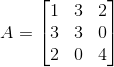
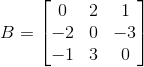
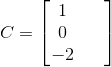
Given matrices A , B, C and D defined by:
132 330 204
B=\begin{bmatrix} 0 & 2 & 1 \\ -2& 0& -3\\ -1 & 3 & 0 \end{bmatrix}
C=\begin{bmatrix} 1& & \\ 0& & \\ -2& & \end{bmatrix}
D=\begin{bmatrix} 3& & \\ 1& & \\ 2& & \end{bmatrix}
Find:
a. The sum of A and B and assign answer to sum. What is the value of sum?
b. Product of A and B and assign answer to prod. What is the value of prod.
c. Determinant of A and assign answer to detA. What is the value of detA?
d. Inverse of B and assign answer to invB. What is the value of invB?
e. B(C-3D) and assign answer to M. What is the value of M?


Solution:
(a). Matlab Code for Q3a.m script:
% Assign matrices A and B
A = [1 3 2; 3 3 0; 2 0 4];
B = [0 2 1; -2 0 3; -1 3 0];
% Assign sum of A and B to Sum
Sum = A+B;
disp(Sum);
(b). Matlab Code for Q3b.m script:
% Assign matrices A and B
A = [1 3 2; 3 3 0; 2 0 4];
B = [0 2 1; -2 0 3; -1 3 0];
% Assign product of A and B to Prod
Prod = A*B;
disp(Prod);
(c). Matlab Code for Q3c.m script:
% Assign matrix A
A = [1 3 2; 3 3 0; 2 0 4];
% Assign determinant of A to detA
detA = det(A);
disp(detA);
(d). Matlab Code for Q3d.m script:
% Assign matrix B
B = [0 2 1; -2 0 3; -1 3 0];
% Assign inverse of B to invB
invB = inv(B);
disp(invB);
(e). Matlab Code for Q3e.m script:
% Assign matrices B, C and D
B = [0 2 1; -2 0 3; -1 3 0];
C = [1; 0; 2];
D = [3; 1; 2];
% Assign B(C-3D) to M
M = B*(C-(3*D));
disp(M);

Free Solution

what are the advantages of google clou?
Advantages of Google Cloud is:-
1) They find helpful in Image , Video analysis
2) They have built in powerful tools for Speech recognition, Text analysis
3) They are also useful in Dynamic translation

Free solution

A data type in which the values are made up of components, or elements, that are themselves values is known as an object data type.
Select one:
True
False
Question 2
Not yet answered
Marked out of 1.00
Flag question
Question text
Given any real numbers a and b, exactly one of the following relations holds: a < b, a > b, or a = b. Thus when you can establish that two of the relations are false, you can assume the remaining one is true.

This principle is known as:
Select one:
a. trichotomy
b. abstraction
c. the distributive property
d. the transitive property
Question 3
Not yet answered
Marked out of 1.00
Flag question
Question text
Given the following code what will the output be?

def find(strng, ch):
index = 0
while index < len(strng):
if strng[index] == ch:
return index
index += 1
return -1

print (find("the doctor is in", '*'))
Select one:
a. -1
b. 0
c. 12
d. 13
Question 4
Not yet answered
Marked out of 1.00
Flag question
Question text
Given the following code, what will the output be?

import string

index = "Ability is a poor man's wealth".find("w")
print(index)
Select one:
a. 24
b. 0
c. 23
d. -1
Question 5
Not yet answered
Marked out of 1.00
Flag question
Question text
: A parameter written in a function header with an assignment to a default value which it will receive if no corresponding argument is given for it in the function call is called an optional parameter.
Select one:
True
False
Question 6
Not yet answered
Marked out of 1.00
Flag question
Question text
What output will the following code produce?

print ("%s %d %f" % (5, 5, 5))
Select one:
a. 5 5 5.000000
b. 5 5 5
c. 5 5.000000
d. 0 5 5.0
Question 7
Not yet answered
Marked out of 1.00
Flag question
Question text
: To create a new object that has the same value as an existing object is know as creating an alias.
Select one:
True
False
Question 8
Not yet answered
Marked out of 1.00
Flag question
Question text
What output will the following code produce?

mylist = [ [2,4,1], [1,2,3], [2,3,5] ]
a=0
b=0
total = 0
while a <= 2:
while b < 2:
total += mylist[a][b]
b += 1
a += 1
b = 0 
print (total)
Select one:
a. 14
b. 23
c. 0
d. 13
Question 9
Not yet answered
Marked out of 1.00
Flag question
Question text
: The following code:

for fruit in ["banana", "apple", "quince"]:
print (fruit)
 
will produce the following output:

banana apple quince
Select one:
True
False
Question 10
Not yet answered
Marked out of 1.00
Flag question
Question text
Given the following code, what will the output be?

mylist = ["now", "four", "is", "score", "the", "and seven", "time", "years", "for"]
a=0
while a < 7:
print (mylist[a],)
a += 2
Select one:
a. now is the time
b. now is the time for
c. for score and seven years
d. now four is score the and seven time years for
Question 11
Not yet answered
Marked out of 1.00
Flag question
Question text
The output of the following code will be:

fruit = "banana"
letter = fruit[1]
print (letter)
Select one:
a. b
b. a
c. n
d. banana
Question 12
Not yet answered
Marked out of 1.00
Flag question
Question text
A variable that has a data type of "str" cannot be a compound data type.
Select one:
True
False
Question 13
Not yet answered
Marked out of 1.00
Flag question
Question text
Traversal can only be accomplished with the "while" loop.
Select one:
True
False
Question 14
Not yet answered
Marked out of 1.00
Flag question
Question text
Strings are easily changed with string slices.
Select one:
True
False
Question 15
Not yet answered
Marked out of 1.00
Flag question
Question text
The elements of a list are immutable.
Select one:
True
False


1. False
A data type in which the values are made up of components, or elements, that are themselves values is known as an Collection data type
2. a. Tricotomy
3. a. -1
The above code returns the index of the character that is passed as second parameter in string passed as first parameter if it is not found after looping through entire array it will return -1
4. a. 24
The above code returns the index of character passed to the function in the string.
5. a True
6. a. 5 5 5.000000
first string, integer and float
7. b. False
Multiple variables containing reference to same object is known as aliases where as to create a new object having same value as existing object is known as clone
8.a. 14
In the above program mylist is a 2-dimensional matrix
and a iterates through rows and b iterates through columns but b runs only till 1 since given b<2
so the total is the sum of first 2 elemnts of each row
total = mylist[0][0]+mylist[0][1]+mylist[1][0]+mylist[1][1]+mylist[2][0]+mylist[2][1] =2+4+1+2+2+3 = 14
9. b. False
The output is
banana
apple
quince
each element is printed on a new line
10. a. now is the time
As in each loop the value of a is incremented by 2 the values of a will be 0,2,4,6
the strings at those positions are printed\
11. option - (b). a
The indexes start from 0 the value at index 1 is a so a is printed
12. a. True
The types which are comprised of smaller types are known as compound data types
13. a. True
14. a. True
15. b . False
Elements in the list are mutable they can be changed

C++ problem Explain briefly what polymorphism is and give a short example

copyable code:
#include<iostream>
using namespace std;
class calc
{
public:
void op(int x, int y)
{
cout<<"multiplication 2 numbers using function op()";
cout<<x*y;
}
void op(int x, int y, int z)
{
cout<<"multiplication 3 numbers using function op()";
cout<<x*y*z;
}
};
int main()
{
calc c;
c.op(5,5);
cout<<endl;
c.op(6,3,4);
return 0;
}
#include<iostream>
using namespace std;
class greeting1
{
public:
void greet()
{
cout<<"hi";
}
};
class greeting2:public greeting1
{
public:
void greet()
{
cout<<" Welcome";
}
};
int main()
{
greeting1 g1;     
greeting2 g2;
g1.greet();
g2.greet();
return 0;
}
#include<iostream>
using namespace std;
class greet1
{
public:
virtual void greet()
{
cout<<"Hello base class greeting";
}
};
class greet2 : public greet1
{
public:
void greet()
{
cout<<"\nHello derived class greeting";
}
};
int main()
{
greet1 g1obj;
greet2 g2obj;
greet1 *ptr;
ptr=&g1obj;
ptr->greet(); // call base class function
ptr=&g2obj;
ptr->greet(); // call derive class function
return 0;
}
#include <iostream>
using namespace std;
class Test
{
private:
int myvalue;
public:
Test(): myvalue(10){}
void operator ++()
{
myvalue = myvalue*5;
}
void disp() { cout<<"after overloading: "<<myvalue; }
};
int main()
{
Test t;
// this calls "function void operator ++()" function
++t;   
t.disp();
return 0;
}
Polymorphism:
The ability of an object to respond differently to different messages is called as polymorphism. Thus an operator or method could be used in different ways. A single name of method or an operators gives multiple meaning.
Types of polymorphism:
  • Runtime.
  • Compile time.
  • Ad-hoc polymorphism.
Compile time polymorphism:
The compile time polymorphism can be achieved in two ways:
Method overloading
It is process of overloading a single method to perform different operations. The method name remains same in performing all operations but the parameter of the function defined gets changed with the method.
Op () method contain 2 parameters in first call and 3 parameters in second call.
using namespace std;
class calc
void op(int x, int y)
cout<<"multiplication 2 numbers using function op()";
void op(int x, int y, int z)
cout<<"multiplication 3 numbers using function op()";
int main()
calc c;
return 0;
Method overriding
A method with same name with same or different parameter is defined in both base class and derived class is called as method overriding.
#include<iostream>
using namespace std;
class greeting1
{
public:
            void greet()
            {
            cout<<"hi";
}
};
class greeting2:public greeting1
{
            public:
            void greet()
            {
            cout<<" Welcome";
            }
};
int main()
{
            greeting1 g1;     
greeting2 g2;
            g1.greet();
            g2.greet();
return 0;
}
Runtime polymorphism:
The runtime polymorphism is achieved by using a virtual function. A virtual function is declared in both base class and derived class. When a same method is defined in both class, the base method is defined with a keyword virtual which is taken as virtual function.
#include<iostream>
using namespace std;
class greet1
{
public:
virtual void greet()
{
cout<<"Hello base class greeting";
}
};
class greet2 : public greet1
{
public:
void greet()
{
cout<<"\nHello derived class greeting";
}
};
int main()
{
greet1 g1obj;
greet2 g2obj;
greet1 *ptr;
ptr=&g1obj;
ptr->greet(); // call base class function
ptr=&g2obj;
ptr->greet(); // call derive class function
return 0;
}
Adhoc polymorphism:
It is also called as operator overloading where an operator is overloaded.for example a + operator is used to concat,add etc
5+5=10
Hello+world=hello world
Here an object gets overloaded to perform a specific task. Consider the following example:
#include <iostream>
using namespace std;
class Test
{
   private:
      int myvalue;
   public:
       Test(): myvalue(10){}
       void operator ++()
       {
          myvalue = myvalue*5;
       }
       void disp() { cout<<"after overloading: "<<myvalue; }
};
int main()
{
    Test t;
    // this calls "function void operator ++()" function
    ++t;  
    t.disp();
    return 0;
}
In the above code ++ operator is overloaded to perform a multiplication operation, the ++ operator function is to increment the given value by one, but in case of overloading the operator it function is changed to perform multiplication

JAVA problem: Number Machine Write a class called Number.java that stores a person

class Numbers {
   int data;
   Numbers(int n) {
       data = n;
   }
   Boolean prime() {
       for (int i = 2; i < data / 2; i++)
           if (data % i == 0)
               return false;
       return true;
   }
   int factorial(int n) {
       if (n == 0)
           return 1;
       else
           return n * factorial(n - 1);
   }
   int fibonacci(int n) {
       if (n == 0)
           return 0;
       else if (n == 1)
           return 1;
       else
           return fibonacci(n - 1) + fibonacci(n - 2);
   }
   int getNum() {
       return data;
   }
   void setNum(int n) {
       data = n;
   }
}
import java.util.Scanner;

public class NumberMachine {
   public static void main(String[] args) {
       System.out.println("Enter your favourate Number :");
       Scanner in = new Scanner(System.in);
       int num = in.nextInt();
       Numbers obj = new Numbers(num);
       if (obj.prime())
           System.out.println("It's prime!!");
       else
           System.out.println("It's not prime!!");
     
       System.out.println("Enter another Number for calculating factorial :");
       num = in.nextInt();
       if (num<0)
           System.out.println("ERROR: Negative Number entered by user!!");
       else
           System.out.println("Factorial is : " +obj.factorial(num));
     
       System.out.println("Enter another Number for calculating fibonacci :");
       num = in.nextInt();
       if (num<0)
           System.out.println("ERROR: Negative Number entered by user!!");
       else
           System.out.println("Ribonacci is : " +obj.fibonacci(num));
     
       System.out.println("Enter another Number to reset your favourate number :");
       num = in.nextInt();
       obj.setNum(num);
     
       System.out.println("Your favourate number is now : "+obj.getNum());
   }
}

Hire Upwork freelance


WordPress|WooCommerce|Joomla|JavaScript|Jquery

I am Web & App Developer having 3+ years experience, Well-versed in numerous programming languages including Java,C#, Asp.net,CSS, PHP, Javascript, Drupal, Joomla and Wordpress. "Muhammad bilal is best developer as i am new here , my website speed was slow and he increase without wasting my time and increasing issues.i made my budget around $100 and i did not know about problem in website but bilal solved this issue and told me about bug, that was really minor bug he could charge $100 but he did not do like that and i am very impressive with him i will give him 5 star and highly recommended for every one" "Muhammad is a very devoted person, who wants to give the best result. He did a good job completing the work on time. Thank you Muhammad, take care!" "Muhammad bilal is best developer. He is a very devoted person, who wants to give the best result. He figured out all the problems the project had and fixed them. He did a good job completing the work on time. Thank you Muhammad, take care!" I have extensive experience in the following fields: Web design; Divi and Avada themes; Website transfers; APIs development and integration; User interface design; WordPress plugin development; WordPress theme development; WPML Multilingual plugin; Performance tuning; Debugging; I'm available 18 HOURS A DAY with a FIBER OPTIC internet and reply EXTREMELY FAST :) I'm also FLUENT in English.

https://www.upwork.com/freelancers/~0139022244ef31d88e
you can check my upwork profile.

Comment for solutiion java

In this assignment you will create two Java programs: 1. The first program will be a class that holds information (variables) about an object of your choice and provides the relevant behavior (methods) 2. The second program will be the main program which will instantiate several objects using the class above, and will test all the functions (methods) of the class above. You cannot use any of the home assignments as your submitted assignment. Your programs must meet the following qualitative and quantitative criteria: A. Your class must: 1. Contain at least 5 instance variables (0.5 marks) 2. Contain at least 2 methods other than the constructor (2 marks) 3. Provide a toString() method to print the data of an object in an appropriately formatted string (this does not count as one of the two methods above). (0.5 marks) B. The main program must: 1. Read its data from System.In using a sentinel value to detect the end of the input. (1 mark) 2. Ensure that input errors will be handled correctly (0.5 marks) 3. Instantiate an array of objects of your class above, using the data input by the user to construct the objects (0.5 marks) 4. Test both methods of the class above (1 mark) 5. Print the content of the object array using the formatted printing method provided by the class (1 mark) 6. Have correct style (use of the standard template, use of comments, correct alignment of statements, good choice of names, appropriate use of case) (1 mark) Can someone please help me by giving an example? Or even an example of each requirement with an explanation. Thanks!

Tuesday, 26 June 2018

FREE Chegg Solution 100%

Hello guys hello you need Chegg free solution so please comment your question link..
+923432547206
bilalarif63@yahoo.com

Free java Solutions

import java.util.*;
public class Orders{

    // Produce all possible orders of specials with replacement;
    // currentOrder is the current order of specials and maxSize is
    // the maximum length desired. allOrderings accumulates string
    // results as they are found.
    public static void orders(ArrayList<String> specials,
                              ArrayList<String> currentOrder,
                              int maxSize,
                              ArrayList<String> allOrders){
        // If currentOrder contains enough specials, add it to the list of
        // allOrders that have been found
        if(currentOrder.size() == maxSize){
            allOrders.add(currentOrder.toString());
            return;
        }

        // Haven't reached maxSize so add each possible special to the
        // end of allOrders and recurse down to continue the
        // search. Remove the special after finishing the recursive call
        // to replace it with another special.
        for(String special : specials){
            currentOrder.add(special);
            orders(specials, currentOrder, maxSize, allOrders);
            currentOrder.remove( currentOrder.size()-1 );
        }
        return;
    }

    // Produce all possible orders of specials with replacement but
    // ensure that no adjacent specials are identical (no adjacent
    // repeats).
    public static void ordersNoAdj(ArrayList<String> specials,
                                   ArrayList<String> currentOrder,
                                   int maxSize,
                                   ArrayList<String> allOrders){
        // If currentOrder contains enough specials, add it to the list of
        // allOrders that have been found
        if(currentOrder.size() == maxSize){
            allOrders.add(currentOrder.toString());
            return;
        }

        // Haven't reached maxSize so add each possible special to the
        // end of allOrders and recurse down to continue the
        // search. Remove the special after finishing the recursive call
        // to replace it with another special. With no adjacent duplicate
        for(String special : specials){
            if (currentOrder.isEmpty() ||
                    !special.equalsIgnoreCase(currentOrder.get(currentOrder.size() - 1))) {
                currentOrder.add(special);
                ordersNoAdj(specials, currentOrder, maxSize, allOrders);
                currentOrder.remove(currentOrder.size() - 1);
            }

        }
        return;
    }

    // Produce all possible orders of specials WITHOUT replacement: each
    // special in an order in allOrders should be unique.
    public static void ordersNoRepeats(ArrayList<String> specials,
                                       ArrayList<String> currentOrder,
                                       int maxSize,
                                       ArrayList<String> allOrders){
        // If currentOrder contains enough specials, add it to the list of
        // allOrders that have been found
        if(currentOrder.size() == maxSize){
            allOrders.add(currentOrder.toString());
            return;
        }

        // Haven't reached maxSize so add each possible special to the
        // end of allOrders and recurse down to continue the
        // search. Remove the special after finishing the recursive call
        // to replace it with another special. With no Repeat
        for(String special : specials){
            if (currentOrder.isEmpty() ||
                    !currentOrder.contains(special)) {
                currentOrder.add(special);
                ordersNoRepeats(specials, currentOrder, maxSize, allOrders);
                currentOrder.remove(currentOrder.size() - 1);
            }

        }
        return;
    }

    public static void main(String args[]){
        ArrayList<String> specials = new ArrayList<String>();
        specials.add("10 Coins Off");
        specials.add("Crushed Turtle");
        specials.add("Firey Flower Pasta");
        specials.add("Mushroom Veal");
        specials.add("Stewed Goomba");

        ArrayList<String> currentOrder = new ArrayList<String>();
        ArrayList<String> allOrders = new ArrayList<String>();
        int maxSize = 4;
        orders(specials, currentOrder, maxSize, allOrders);

        System.out.printf("%d orders\n",allOrders.size());
        for(String order : allOrders){
            System.out.println(order);
        }


        System.out.println();

        // Now without adjacent repeats
        System.out.println("\n\nNow without adjacent repeats\n\n");
        allOrders.clear();
        currentOrder.clear();
        ordersNoAdj(specials, currentOrder, maxSize, allOrders);

        System.out.printf("%d orders\n",allOrders.size());
        for(String order : allOrders){
            System.out.println(order);
        }

        System.out.println("\n\nNow without any repeats\n\n");

        // Now without any repeats
        allOrders.clear();
        currentOrder.clear();
        ordersNoRepeats(sp
ecials, currentOrder, maxSize, allOrders);

        System.out.printf("%d orders\n",allOrders.size());
        for(String order : allOrders){
            System.out.println(order);
        }

    }

}

Free java Solution


Project Overview
This project will be quite different from our previous projects. Rather than writing production code, you will instead be writing tests in one part and using the debugger in the other. The project is smaller than P4 and our deadline reflects that. There are two main portions:
Problem 1: Testing
The first part of the project focuses on developing the ability to write test cases for an existing class.
In the project pack, a directory called testme contains multiple implementations of a simple system to calculate various salary-related things. One of these implementations is correct, while the remaining ones all contain bugs. You will write test cases based on the provided class documentation to discern which implementation is correct. The correct implementation should pass all tests while the buggy versions should all fail at least one test, likely many more. You will earn credit for each wrong implementation that fails tests (when the correct one is still passing tests!), and for correctly identifying the correct version.
Importantly, you do not have access to the source code for any of the implementations. Instead, you must rely on the documentation of the intended purpose of the classes to develop your tests.
Each implementation is in its own package and subdirectory. Later sections describe how to run your single testing file against any particular implementation without copying files around. (hint: opening and closing files repeatedly in DrJava is not a good workflow).
Problem 2: Debugging
The second part of the project involves developing your skills to trace code and utilize the debugger to follow execution.
The debugme directory of the project pack contains DebugMe.java, a sneaky program which requires a lot of command line arguments to be passed into it to run to completion. The first argument will always be your GMU netID (e.g. gmason76) which will uniquely use the arguments for you in ways different from other students.
DebugMe.java is divided into a series of phases with each requiring different command line input to complete. Your task is to use the debugger, reverse-engineer what is
Project Overview
This project will be quite different from our previous projects. Rather than writing production code, you will instead be writing tests in one part and using the debugger in the other. The project is smaller than P4 and our deadline reflects that. There are two main portions:
Problem 1: Testing
The first part of the project focuses on developing the ability to write test cases for an existing class.
In the project pack, a directory called testme contains multiple implementations of a simple system to calculate various salary-related things. One of these implementations is correct, while the remaining ones all contain bugs. You will write test cases based on the provided class documentation to discern which implementation is correct. The correct implementation should pass all tests while the buggy versions should all fail at least one test, likely many more. You will earn credit for each wrong implementation that fails tests (when the correct one is still passing tests!), and for correctly identifying the correct version.
Importantly, you do not have access to the source code for any of the implementations. Instead, you must rely on the documentation of the intended purpose of the classes to develop your tests.
Each implementation is in its own package and subdirectory. Later sections describe how to run your single testing file against any particular implementation without copying files around. (hint: opening and closing files repeatedly in DrJava is not a good workflow).
Problem 2: Debugging
The second part of the project involves developing your skills to trace code and utilize the debugger to follow execution.
The debugme directory of the project pack contains DebugMe.java, a sneaky program which requires a lot of command line arguments to be passed into it to run to completion. The first argument will always be your GMU netID (e.g. gmason76) which will uniquely use the arguments for you in ways different from other students.
DebugMe.java is divided into a series of phases with each requiring different command line input to complete. Your task is to use the debugger, reverse-engineer what is happening in each phase-method, and determine what command-line arguments are necessary in order to satisfy the phase. When missing or improper inputs are detected in a phase, the program throws exceptions and escapes back to attempt the next phase. You will earn points for each phase that you successfully "defuse".

Project Files

Here is the directory structure in p5pack.zip:
p5pack/
|
+--ANSWERS.txt : Describe written answers to problems in this file
|
+--debugme/
|  |
|  +--DebugMe.java
|
+--testme/
   |
   +--docs/               (javadoc output for an implementation)
   |  |
   |  +--index.html
   |  +--...
   |
   +--PayrollTest.java  (write more tests here)
   |
   +--junit-4.12.jar
   |
   +--imp1/
   |  |
   |  +--payroll
   |     |
   |     +--Dict.class
   |     |
   |     +--Payroll.class
   | 
   +--imp2/
   |  |
   |  +--payroll
   |     |
   |     +--Dict.class
   |     |
   |     +--Payroll.class
   | 
   +--remaining impN/ directories: same structure as imp1/ and imp2/ above
   |
   ...

Problem 1: Test Mode Activated

The first task is to add many @Test-annotated methods to PayrollTest.javaand determine which of the many implementations are bad, and which one is good. Then describe your results in ANSWERS.txt.
The code we're testing out tries to calculate various salary-related things based on employees and their (yearly) salaries. The implementor got a bit carried away and made a very generic Dict<K,V> class to track the (key,value) pairings representing (employee-name, yearly-salary), as part of the calculation.
We linked the Javadoc documentation to this part of the project at the top of this specification. A copy is also included in p5pack/testme/docs. You could locally open up the p5pack/testme/docs/index.html file without being online.
We're only supplying the .class files for each implementation; you don't get to look for the bugs directly, you have to just think about what the purpose of the code is, and then write test cases based on that purpose. (You're writing "black box" test cases).

Running Your Tests

Note that running one test file against many implementations can be tedious if we're not smart about it. A typical (but bad) novice approach is to make many copies of the file which will quickly get out of sync as changes are made to one and the copies are not updated.
Instead, utilize the ability of the compiler and runtime of java to set a class path on the command line to cause a search for classes in the specified locations. Navigate to the testme/ directory and run commands like the following which runs tests on implementation 1 only:
demo$ javac -cp .:imp1/:junit-4.12.jar *.java
demo$ java  -cp .:imp1/:junit-4.12.jar PayrollTest
These commands tell Java that it should first compile all .java files it finds when looking in the current directory (.), in the imp1/ directory, and it should also look through the junit-4.12.jar file while compiling; then, it again needs access to code in all three of those locations, but it should run the mainmethod of PayrollTest.
If you want to run tests on a different implementation, just change the imp1 to a different directory, as in
demo$ javac -cp .:imp2/:junit-4.12.jar *.java
demo$ java  -cp .:imp2/:junit-4.12.jar PayrollTest
For this task, the command line is likely superior to most IDEs. For instance, these commands will not work in DrJava. It's likely that most IDEs will struggle with this task. Take this as an opportunity to beef up your command line skills. It offers the ultimate flexibility and the only price to unlock that is a little practice (on the order of cut-pasting some ready-made commands).

Scripts to run tests

To ease the task of testing on the command line, two scripts are provided which will compile and run all implementations.
On Unix/Mac OS X use the unix-compile-test.sh script in a terminal.
> cd testme
> unix-compile-test.sh
Results of testing all implementations are summarized by only showing how many tests failed (or that it was OK!). If you need to understand why a particualr implementation is behaving some way, then don't use the script here, use the just-one-implementation commands shown above!
On Windows use the windows-compile-test.cmd script in the cmd.exeterminal.
> cd testme
> windows-compile-test.cmd
Results will be left in the results.txt text file due to the lack of a good grepon the Windows platform.

Goals for the Testing Problem

Multiple implementations of the payroll package are provided. One of these is correct while the remainder are crap. It is known that implementations imp2imp8, and imp11 are broken.
To complete this project, do the following:
  • Create enough tests that all implementations but one are failing at least one test.
  • Write tests for both the Dict and Payroll classes. Problems may exist in one, the other, or both.
  • Document your test cases to indicate what they are testing. Part of your grade will be assigned based on the documentation of test cases.
  • Submit your PayrollTest.java file which we will run against all implementations.
  • Identify the general flaws in the behavior of each of the known broken implementations. Describe these flaws in a few sentences in the provided ANSWERS.txt file which will be submitted with your code.

(40%) Grading Criteria for the Testing Problem   GRADING

  • 10% : Identify the correct implementation and report it in ANSWERS.txt. This implementation must pass all of your test cases to get the full 10% credit here. Narrowing to limited candidates gets partial credit. (e.g., if you're not sure which of 2-3 remaining implementations is the correct one, but it is still in those remaining ones, you'll get a bit of credit).
  • 12% : Each faulty implementation fails at least one test in yourP5Tests (1% per implementation). Points might not be earned if all implementations (including the correct one) fail at least one test! That would mean you have bogus tests that definitely aren't correct, themselves.
  • 9% : PayrollTest documents the intent of each test case using clear comments.
  • 9% (3% each) : Flaws in the known broken implementations are adequately described in ANSWERS.txt .

Demo of Dict

The Dict class provides a quite simple dictionary implementation. Below is a demonstration of creating one and calling some of its methods.
> import payroll.*;
> Dict<String,Integer> d = new Dict<String,Integer>();
> d.put("one",1);
> d
{(one:1)}
> d.size()
1
> d.put("two",2);
> d.put("three",3);
> d.size()
3
> d.get("one")
1
> d.get("350")
java.util.NoSuchElementException: "350" key not in dict.
     at payroll.Dict.complainNoKey(Dict.java:147)
     at payroll.Dict.get(Dict.java:70)
> d.pop("two")
2
> d.toString()
"{(one:1),(three:3)}"
> d.keys()
[one, three]
> d.clear()
> d
{}

Demo of Payroll

The Payroll class uses the Dict class in its implementation of some salary-related calculations. Below is a demonstration of some basic uses of Payroll.
> import payroll.*;
> Payroll p = new Payroll()
> p.hire("A",120);
> p.hire("A",120)
> p.hire("B",240)
> p.employees()
[A, B]
> p.topSalary()
240
> p.hire("C",1500)
> p.topSalary()
1500
> p.fire("C")
true
> p.employees()
[A, B]
> p.fire("C")
false
> p.giveRaise("A",0.5)
> p.getSalary("A")
180
> p.giveRaise(1.0) // everyone gets 100% raise!
> p.getSalary("A")
360
> p.getSalary("B")
480
> p.monthlyExpense() // for one month of twelve.
70

Problem 2: DebugMe!

A Programming Puzzle

The file debugme/DebugMe.java is provided in the code pack and contains a puzzle. The main() method in this program accepts a series of command line arguments that, when correctly specified, will cause the program to run to completion. If the command line arguments are not specified correctly, the program will fail prematurely. The purpose of this problem is to determine the correct inputs to cause the program to run to completion.
DebugMe is arranged in "stages" and passing stages earns points. After each run the program prints the points earned based on the stages "passed". Example:
> java DebugMe msnyde14 0 0 0
Let the games... BEGIN!
Phase One, let's have some fun!
 
     Double debugger burger, order up!
 
oops! Game Over... >:( 
 
  * Score: 0/55 pts *
Notice that the first argument is always your NetID. Don't use msnyde14unless you are Prof. Snyder. DebugMe uses your NetID to create a unique set of conditions which you must pass so that your experience with the program will likely be different from other students.
This task is actually kinder to you - if you fail one phase, you are able to continue to the next.
The stages in DebugMe are intentionally obscure. This is code that is meant to be a puzzle rather than easily readable and to that end, you are strongly encouraged to use a debugger while analyzing the program. Debuggers allow you to stop execution at any point and examine variables, step forward line by line, and ultimately identify which kinds of command line arguments will make it through a stage and which will cause the dreaded failure()method to be invoked ending the run. A primary goal of this problem is to gain experience with debuggers as they are incredibly useful tool for a programmer to have in their utility belt. Credit for the problem is entirely based on how many stages are passed.

Command Line Arguments

The only artifact of your efforts will be the specific command-line invocation of the program, as your only inputs are given as command-line arguments.
  • the first command-line argument must be your GMU netID, e.g. gmason76. Many of the phases will use this to randomize and personalize the code for you - you've got your very own unique project!
  • each phase (method) will read the next few arguments (however many it needs), and use them in more and more quirky ways.
  • towards the end of each phase, there will be some check and a guarded call to failure(). Your goal is to figure out what command-line arguments will cause these failures to never happen.
  • if you need to include spaces in a single argument, please use double-quotes.

Running DebugMe through the Debugger

How can we use the debugger with command-line arguments? It's surprisingly easy in DrJava:
  • Compile DebugMe.java
  • Set a breakpoint in the phase you're working on
  • Turn on debugging mode under the debugging menu
  • In the Interactions Pane, run a command like this to launch DebugMewith command line arguments.
> java DebugMe msnyde14 0 0 0
Let the games... BEGIN!
Phase One, let's have some fun!
oops! Game Over... >:( 
 
     error msg: Failure! Double debugger burger, order up!
 
  * Score: 0/55 pts.
If you've turned on debugging, though, you get to step through and see what's happening.
  • Most IDEs have a means of running a program through a debugger. Learn about your tool if you are not using DrJava.
  • For the brave, there is also a command line debugger, command jdbwhich should be installed with every JDK. This is somewhat less convenient as it provides only limited source code display but can work with some classic unix tools.
Regardless of how you access the debugger, you will want to familiarize yourself with features such setting breakpoints to stop the running program, stepping forward line by line, and displaying the values of variables.
DebugMe is not a "real" program as it is intentionally obscure. However, as an exercise to learn how to analyze running programs it will provide invaluable experience. Happy bug squashing.

(60%) Grading Criteria for Problem 2: Debugging   GRADING

  • 55% : In ANSWERS.txt, report your command line after passing as many phases as possible. Paste the entire thing in, including java yourNetID. To complete all phases, a total of 29 command line args including NetID are required.
  • 5% : In ANSWERS.txt describe your experience using the debugger. What helped, what frustrated, and what lessons will you take forward? Limit your description to one to two paragraphs.


Make sure to answer the required questions in ANSWERS.txt. This file is provided as part of the project pack. It is also printed below.
PROBLEM 1: TESTING
==================

(10%) The correct implementation is: (fill in your answer below)

imp #:


--------------------------------------------------------------------------------

KNOWN FAULTY IMPLEMENTATIONS (2, 8, 11)
----------------------------

(3%) Describe the general problems with imp2


(3%) Describe the general problems with imp8


(3%) Describe the general problems with imp11


--------------------------------------------------------------------------------

PROBLEM 2: DEBUGGING
====================

--------------------------------------------------------------------------------
(55%) Include the command line you found to pass as many phases as
possible. Include your NetID at the beginning.  To complete all
phases, a total of 29 command line args including NetID are required.

java DebugMe netID


--------------------------------------------------------------------------------
(5%) Describe your experience using the debugger. What helped, what
frustrated, and what lessons will you take forward? Limit your
description to one to two paragraphs please.


-------------------------------------------------------------------------

+--docs/               (javadoc output for an implementation)
   |  |
   |  +--index.html
   |  +--...
   |
   +--PayrollTest.java  (write more tests here)
   |
   +--junit-4.12.jar
   |
   +--imp1/
   |  |
   |  +--payroll
   |     |
   |     +--Dict.class
   |     |
   |     +--Payroll.class
   | 
   +--imp2/

Project Overview
This project will be quite different from our previous projects. Rather than writing production code, you will instead be writing tests in one part and using the debugger in the other. The project is smaller than P4 and our deadline reflects that. There are two main portions:
Problem 1: Testing
The first part of the project focuses on developing the ability to write test cases for an existing class.
In the project pack, a directory called testme contains multiple implementations of a simple system to calculate various salary-related things. One of these implementations is correct, while the remaining ones all contain bugs. You will write test cases based on the provided class documentation to discern which implementation is correct. The correct implementation should pass all tests while the buggy versions should all fail at least one test, likely many more. You will earn credit for each wrong implementation that fails tests (when the correct one is still passing tests!), and for correctly identifying the correct version.
Importantly, you do not have access to the source code for any of the implementations. Instead, you must rely on the documentation of the intended purpose of the classes to develop your tests.
Each implementation is in its own package and subdirectory. Later sections describe how to run your single testing file against any particular implementation without copying files around. (hint: opening and closing files repeatedly in DrJava is not a good workflow).
Problem 2: Debugging
The second part of the project involves developing your skills to trace code and utilize the debugger to follow execution.
The debugme directory of the project pack contains DebugMe.java, a sneaky program which requires a lot of command line arguments to be passed into it to run to completion. The first argument will always be your GMU netID (e.g. gmason76) which will uniquely use the arguments for you in ways different from other students.
DebugMe.java is divided into a series of phases with each requiring different command line input to complete. Your task is to use the debugger, reverse-engineer what is happening in each phase-method, and determine what command-line arguments are necessary in order to satisfy the phase. When missing or improper inputs are detected in a phase, the program throws exceptions and escapes back to attempt the next phase. You will earn points for each phase that you successfully "defuse".

Project Files

Here is the directory structure in p5pack.zip:
p5pack/
|
+--ANSWERS.txt : Describe written answers to problems in this file
|
+--debugme/
|  |
|  +--DebugMe.java
|
+--testme/
   |
   +--docs/               (javadoc output for an implementation)
   |  |
   |  +--index.html
   |  +--...
   |
   +--PayrollTest.java  (write more tests here)
   |
   +--junit-4.12.jar
   |
   +--imp1/
   |  |
   |  +--payroll
   |     |
   |     +--Dict.class
   |     |
   |     +--Payroll.class
   | 
   +--imp2/
   |  |
   |  +--payroll
   |     |
   |     +--Dict.class
   |     |
   |     +--Payroll.class
   | 
   +--remaining impN/ directories: same structure as imp1/ and imp2/ above
   |
   ...

Problem 1: Test Mode Activated

The first task is to add many @Test-annotated methods to PayrollTest.javaand determine which of the many implementations are bad, and which one is good. Then describe your results in ANSWERS.txt.
The code we're testing out tries to calculate various salary-related things based on employees and their (yearly) salaries. The implementor got a bit carried away and made a very generic Dict<K,V> class to track the (key,value) pairings representing (employee-name, yearly-salary), as part of the calculation.
We linked the Javadoc documentation to this part of the project at the top of this specification. A copy is also included in p5pack/testme/docs. You could locally open up the p5pack/testme/docs/index.html file without being online.
We're only supplying the .class files for each implementation; you don't get to look for the bugs directly, you have to just think about what the purpose of the code is, and then write test cases based on that purpose. (You're writing "black box" test cases).

Running Your Tests

Note that running one test file against many implementations can be tedious if we're not smart about it. A typical (but bad) novice approach is to make many copies of the file which will quickly get out of sync as changes are made to one and the copies are not updated.
Instead, utilize the ability of the compiler and runtime of java to set a class path on the command line to cause a search for classes in the specified locations. Navigate to the testme/ directory and run commands like the following which runs tests on implementation 1 only:
demo$ javac -cp .:imp1/:junit-4.12.jar *.java
demo$ java  -cp .:imp1/:junit-4.12.jar PayrollTest
These commands tell Java that it should first compile all .java files it finds when looking in the current directory (.), in the imp1/ directory, and it should also look through the junit-4.12.jar file while compiling; then, it again needs access to code in all three of those locations, but it should run the mainmethod of PayrollTest.
If you want to run tests on a different implementation, just change the imp1 to a different directory, as in
demo$ javac -cp .:imp2/:junit-4.12.jar *.java
demo$ java  -cp .:imp2/:junit-4.12.jar PayrollTest
For this task, the command line is likely superior to most IDEs. For instance, these commands will not work in DrJava. It's likely that most IDEs will struggle with this task. Take this as an opportunity to beef up your command line skills. It offers the ultimate flexibility and the only price to unlock that is a little practice (on the order of cut-pasting some ready-made commands).

Scripts to run tests

To ease the task of testing on the command line, two scripts are provided which will compile and run all implementations.
On Unix/Mac OS X use the unix-compile-test.sh script in a terminal.
> cd testme
> unix-compile-test.sh
Results of testing all implementations are summarized by only showing how many tests failed (or that it was OK!). If you need to understand why a particualr implementation is behaving some way, then don't use the script here, use the just-one-implementation commands shown above!
On Windows use the windows-compile-test.cmd script in the cmd.exeterminal.
> cd testme
> windows-compile-test.cmd
Results will be left in the results.txt text file due to the lack of a good grepon the Windows platform.

Goals for the Testing Problem

Multiple implementations of the payroll package are provided. One of these is correct while the remainder are crap. It is known that implementations imp2imp8, and imp11 are broken.
To complete this project, do the following:
  • Create enough tests that all implementations but one are failing at least one test.
  • Write tests for both the Dict and Payroll classes. Problems may exist in one, the other, or both.
  • Document your test cases to indicate what they are testing. Part of your grade will be assigned based on the documentation of test cases.
  • Submit your PayrollTest.java file which we will run against all implementations.
  • Identify the general flaws in the behavior of each of the known broken implementations. Describe these flaws in a few sentences in the provided ANSWERS.txt file which will be submitted with your code.

(40%) Grading Criteria for the Testing Problem   GRADING

  • 10% : Identify the correct implementation and report it in ANSWERS.txt. This implementation must pass all of your test cases to get the full 10% credit here. Narrowing to limited candidates gets partial credit. (e.g., if you're not sure which of 2-3 remaining implementations is the correct one, but it is still in those remaining ones, you'll get a bit of credit).
  • 12% : Each faulty implementation fails at least one test in yourP5Tests (1% per implementation). Points might not be earned if all implementations (including the correct one) fail at least one test! That would mean you have bogus tests that definitely aren't correct, themselves.
  • 9% : PayrollTest documents the intent of each test case using clear comments.
  • 9% (3% each) : Flaws in the known broken implementations are adequately described in ANSWERS.txt .

Demo of Dict

The Dict class provides a quite simple dictionary implementation. Below is a demonstration of creating one and calling some of its methods.
> import payroll.*;
> Dict<String,Integer> d = new Dict<String,Integer>();
> d.put("one",1);
> d
{(one:1)}
> d.size()
1
> d.put("two",2);
> d.put("three",3);
> d.size()
3
> d.get("one")
1
> d.get("350")
java.util.NoSuchElementException: "350" key not in dict.
     at payroll.Dict.complainNoKey(Dict.java:147)
     at payroll.Dict.get(Dict.java:70)
> d.pop("two")
2
> d.toString()
"{(one:1),(three:3)}"
> d.keys()
[one, three]
> d.clear()
> d
{}

Demo of Payroll

The Payroll class uses the Dict class in its implementation of some salary-related calculations. Below is a demonstration of some basic uses of Payroll.
> import payroll.*;
> Payroll p = new Payroll()
> p.hire("A",120);
> p.hire("A",120)
> p.hire("B",240)
> p.employees()
[A, B]
> p.topSalary()
240
> p.hire("C",1500)
> p.topSalary()
1500
> p.fire("C")
true
> p.employees()
[A, B]
> p.fire("C")
false
> p.giveRaise("A",0.5)
> p.getSalary("A")
180
> p.giveRaise(1.0) // everyone gets 100% raise!
> p.getSalary("A")
360
> p.getSalary("B")
480
> p.monthlyExpense() // for one month of twelve.
70

Problem 2: DebugMe!

A Programming Puzzle

The file debugme/DebugMe.java is provided in the code pack and contains a puzzle. The main() method in this program accepts a series of command line arguments that, when correctly specified, will cause the program to run to completion. If the command line arguments are not specified correctly, the program will fail prematurely. The purpose of this problem is to determine the correct inputs to cause the program to run to completion.
DebugMe is arranged in "stages" and passing stages earns points. After each run the program prints the points earned based on the stages "passed". Example:
> java DebugMe msnyde14 0 0 0
Let the games... BEGIN!
Phase One, let's have some fun!
 
     Double debugger burger, order up!
 
oops! Game Over... >:( 
 
  * Score: 0/55 pts *
Notice that the first argument is always your NetID. Don't use msnyde14unless you are Prof. Snyder. DebugMe uses your NetID to create a unique set of conditions which you must pass so that your experience with the program will likely be different from other students.
This task is actually kinder to you - if you fail one phase, you are able to continue to the next.
The stages in DebugMe are intentionally obscure. This is code that is meant to be a puzzle rather than easily readable and to that end, you are strongly encouraged to use a debugger while analyzing the program. Debuggers allow you to stop execution at any point and examine variables, step forward line by line, and ultimately identify which kinds of command line arguments will make it through a stage and which will cause the dreaded failure()method to be invoked ending the run. A primary goal of this problem is to gain experience with debuggers as they are incredibly useful tool for a programmer to have in their utility belt. Credit for the problem is entirely based on how many stages are passed.

Command Line Arguments

The only artifact of your efforts will be the specific command-line invocation of the program, as your only inputs are given as command-line arguments.
  • the first command-line argument must be your GMU netID, e.g. gmason76. Many of the phases will use this to randomize and personalize the code for you - you've got your very own unique project!
  • each phase (method) will read the next few arguments (however many it needs), and use them in more and more quirky ways.
  • towards the end of each phase, there will be some check and a guarded call to failure(). Your goal is to figure out what command-line arguments will cause these failures to never happen.
  • if you need to include spaces in a single argument, please use double-quotes.

Running DebugMe through the Debugger

How can we use the debugger with command-line arguments? It's surprisingly easy in DrJava:
  • Compile DebugMe.java
  • Set a breakpoint in the phase you're working on
  • Turn on debugging mode under the debugging menu
  • In the Interactions Pane, run a command like this to launch DebugMewith command line arguments.
> java DebugMe msnyde14 0 0 0
Let the games... BEGIN!
Phase One, let's have some fun!
oops! Game Over... >:( 
 
     error msg: Failure! Double debugger burger, order up!
 
  * Score: 0/55 pts.
If you've turned on debugging, though, you get to step through and see what's happening.
  • Most IDEs have a means of running a program through a debugger. Learn about your tool if you are not using DrJava.
  • For the brave, there is also a command line debugger, command jdbwhich should be installed with every JDK. This is somewhat less convenient as it provides only limited source code display but can work with some classic unix tools.
Regardless of how you access the debugger, you will want to familiarize yourself with features such setting breakpoints to stop the running program, stepping forward line by line, and displaying the values of variables.
DebugMe is not a "real" program as it is intentionally obscure. However, as an exercise to learn how to analyze running programs it will provide invaluable experience. Happy bug squashing.

(60%) Grading Criteria for Problem 2: Debugging   GRADING

  • 55% : In ANSWERS.txt, report your command line after passing as many phases as possible. Paste the entire thing in, including java yourNetID. To complete all phases, a total of 29 command line args including NetID are required.
  • 5% : In ANSWERS.txt describe your experience using the debugger. What helped, what frustrated, and what lessons will you take forward? Limit your description to one to two paragraphs.


Make sure to answer the required questions in ANSWERS.txt. This file is provided as part of the project pack. It is also printed below.
PROBLEM 1: TESTING
==================

(10%) The correct implementation is: (fill in your answer below)

imp #:


--------------------------------------------------------------------------------

KNOWN FAULTY IMPLEMENTATIONS (2, 8, 11)
----------------------------

(3%) Describe the general problems with imp2


(3%) Describe the general problems with imp8


(3%) Describe the general problems with imp11


--------------------------------------------------------------------------------

PROBLEM 2: DEBUGGING
====================

--------------------------------------------------------------------------------
(55%) Include the command line you found to pass as many phases as
possible. Include your NetID at the beginning.  To complete all
phases, a total of 29 command line args including NetID are required.

java DebugMe netID


--------------------------------------------------------------------------------
(5%) Describe your experience using the debugger. What helped, what
frustrated, and what lessons will you take forward? Limit your
description to one to two paragraphs please.


-------------------------------------------------------------------------